BBMP: The Based Black Music Player
BBMP is my personal music player. BBMP is currently only supported on Linux, not especially user-friendly, and under development.
Background
I wrote BBMP after trying every other music player available on Linux, and being ultimately dissatisfied with my options. For awhile I settled on ncmpcpp - but I love album art and, given that it's an Ncurses client, I had to do a bunch of wacky hijinks to display the currently playing album's cover. Eventually I decided to try building my own solution. As I was inspired by ncmpcpp, BBMP started as an MPD client. BBMP now uses Miniaudio so it can be a fully standalone music player.
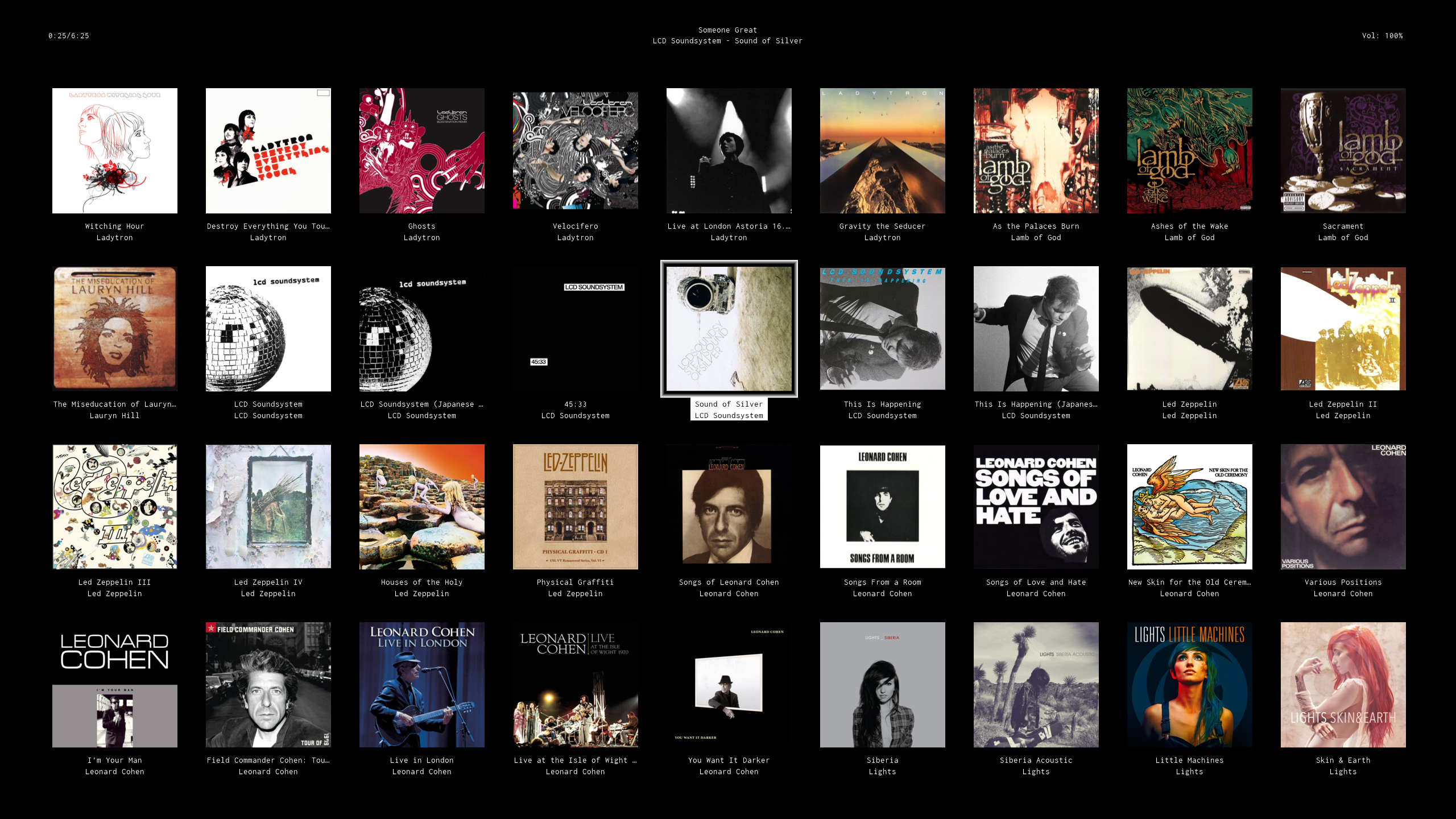
Below are my two favorite views in BBMP. The first is the Library Album Art view (click to enlarge):
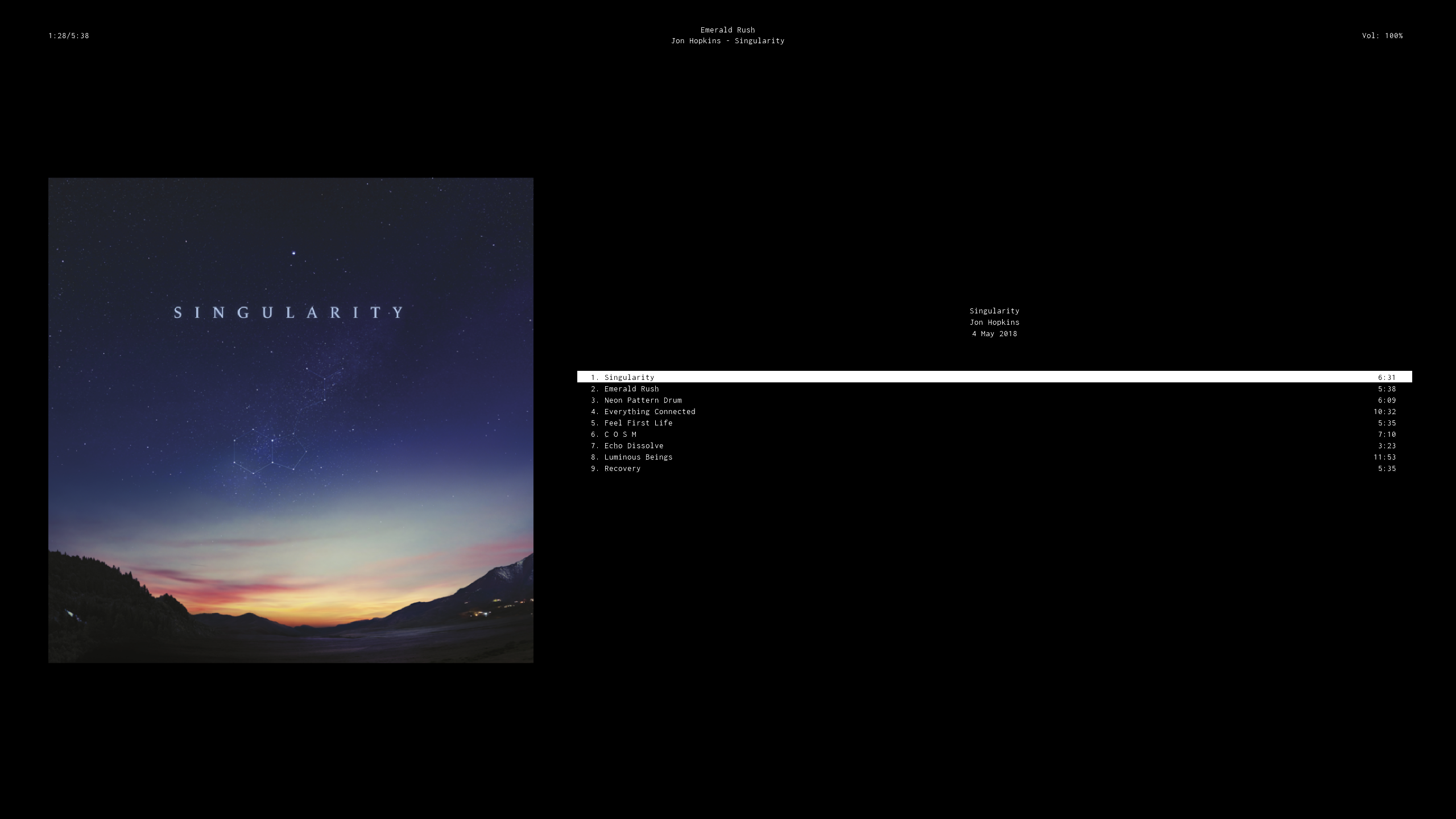
And the second is the Album Art view:
Downloading
Contact dmgrisham(at)gmail(dot)com for the binary.
Requirements
BBMP is currently built to run on Linux systems with modern 64-bit (x86-64) processors.
Audio Codecs
Only MP3 files with ID3v2.4 tags are supported at the moment.
M4A/AAC is also supported by a separate build - but, since BBMP distributed as a single binary, you must have the following libraries (including the listed version) installed on your system:
libfdk-aac.so.2libavformat.so.61libavcodec.so.61libavutil.so.59
Since Miniaudio supports FLAC and WAV, support for those formats will be possible once BBMP can parse their respective tags.
Configuration
At the moment the config file must be created manually, and requires one line: the path to your music library.
If you have XDG_CONFIG_HOME defined in your environment, then you should save your config to $XDG_CONFIG_HOME/bbmp/bbmprc.
Otherwise, save it to ~/.config/bbmp/bbmprc.
For example, all of my music is stored in ~/media/music/library, so my config file at ~/.config/bbmp/bbmprc is defined as:
library_directory = ~/media/music/library
The other configuration values you can define are:
playlist_directory: A directory containing playlist files you want BBMP to load. Only supports.m3uplaylistsplaylists at the moment. Defaults toplaylists/in your config directory, e.g.~/.config/bbmp/playlists.
Launching BBMP
When you first start BBMP, it'll scan the library_directory you defined above for all supported music files.
The metadata of each file will be parsed, which can take awhile, and you'll see the progress at the bottom left.
NOTE: At the moment you have wait for BBMP to scan ALL of the music files - if you exit before it does, it'll restart the entire scan from the start. This, along with the handling of additions/changes to the library, will be improved in the future.
For every album that's found, BBMP will look for an album cover named cover.jpg or cover.png alongside that
album's songs - here's an example folder structure for the album Singularity by Jon Hopkins:
jon_hopkins
└── 2018_05-singularity
    ├── 1_01-singularity.mp3
    ├── 1_02-emerald_rush.mp3
    ├── 1_03-neon_pattern_drum.mp3
    ├── 1_04-everything_connected.mp3
    ├── 1_05-feel_first_life.mp3
    ├── 1_06-c_o_s_m.mp3
    ├── 1_07-echo_dissolve.mp3
    ├── 1_08-luminous_beings.mp3
    ├── 1_09-recovery.mp3
    └── cover.jpg
That cover.jpg will be used to create the covers BBMP uses to quickly load and display the thumbnail + large album covers as you navigate
your music library. The higher-resolution these images are, the better they'll look.
Navigation and Playing Music
Multi-Queue Functionality
You can have multiple queues loaded at once, all at your discretion. When you start a new queue while one is already playing, your spot in the previous queue will be bookmarked for later. Right-click on an item in your library to see your options for adding to existing/new queues, as well as the keybindings below.
Also pay attention to the bottom-right of BBMP, where you'll see the 'Playing queue', and if you're currently editing a different
queue than the one that's currently playing you'll see the 'Modifying queue' above that. Additionally, if you navigate to the Queue view,
the queue you select with your cursor will be the one modified if you start adding songs (hit i to show the column of Queues).
The details/use-cases of multi-queue functionality are still being worked out, but the basics should all be in place for you to play with.
Mouse Actions
The mouse can perform most of the basic navigation, and right-clicking on items pulls up additional actions for adding songs to queues/etc.
Double clicking an individual song will act the same as pressing Enter on it - i.e. the song will be added to the end of the currently
selected queue, and will start playing.
Keyboard Actions
There are a few global keybindings, then each view has its own keybindings.
Also note that the Caps Lock key is globally mapped to Ctrl, at least right now.
Global
1: Go to the Now Playing view2: Go to the Queue3: Go to the Library Album Art4: Go to the Library5: Go to the Playlists viewp: Toggle pauseb: Rewindf: Fast forward<: Previous song>: Next song=: Volume up-: Volume down=: Volume up-: Volume downCtrl-c: Clear the queueQ: Quit the programCtrl-t: Toggle whether the view titles in the header are shown/hiddenCtrl-↑: Increase the font sizeCtrl-↓: Decrease the font size
The following keybindings apply to all views where you have a cursor to interact with songs.
-
k: Move the cursor up -
j: Move the cursor down -
h: Move the cursor left -
l: Move the cursor right -
Ctrl-d: Jump the cursor a half/full page down -
Ctrl-u: Jump the cursor a half/full page up -
g: Go to the top of the page -
G: Go to the bottom of the page -
o: Go to the currently playing song -
Space: Add the selection to the queue -
Enter: Add the selection to the queue and play the first song that was added -
Shift-Space: Add the selected album to a new queue -
Shift-Enter: Add the selected album to a new queue and play it -
/: Start a searchEnter/Escape: Submit the search
-
n: Move the cursor to the next search result -
N: Move the cursor to the previous search result
Queue View
J: Shift the selected song up in the queueK: Shift the selected song down in the queuex: Delete the selected song from the queuei: Toggle the Queues column on the leftH: Move to the queue before this one.L: Move to the queue after this one.
And if the Queues column is selected:
R: Rename the selected queue (purely for your readability)
Library Album Art View
i: Toggle between the library and album subviews. Double-clicking on the album cover will toggle this as well.
Additional Notes
BBMP caches files to ~/.cache/bbmp (or $XDG_CACHE_HOME/bbmp if XDG_CACHE_HOME is defined).
This includes a backup of the parsed tags from the library's music files, as well as all of the album cover files it generates.
As noted above, new music files/tag changes to existing songs are not currently processed. So, at the moment, rescanning the library
requires that you exit BBMP, remove the cached library (with e.g. rm ~/.cache/bbmp/library_backup), and start BBMP again so it can
scan your files.